PLC and Industrial PC Cabinet Cooling Fans
A PLC or industrial PC can have a local temperature problem even when the cabinet’s average air temperature appears acceptable. First preserve the equipment manufacturer’s mounting clearances and identify the air reaching the affected device. Consider an internal fan only when the enclosure can reject the combined heat and a defined circulation path can address the hot spot. A slim SXDOOL fan is a candidate for evaluation where depth is limited; it is not a qualified replacement for an IPC’s original cooling assembly.
This guide addresses PLC and industrial-PC electronics inside automation cabinets. For panel openings, filter-fan assemblies and whole-cabinet air exchange, use the industrial control cabinet cooling guide. For machine-tool drive electronics and coolant exposure, see CNC control cabinet cooling.
Locate the heat and the temperature limit that matter
Record the installed PLC CPU and I/O modules, industrial-PC processor and storage configuration, local power supplies and nearby heat sources. An IPC running visualization, data logging or machine-vision tasks can present a different thermal duty from the same unit at idle. Ask for component losses and the permitted temperature at each device’s specified measurement point; do not substitute the cabinet’s supply rating or a room-temperature reading.
Map air temperature near the controller or PC inlet, the enclosure’s cooler region and the discharge region under the intended workload. Check whether warm air from an adjacent power supply is returning to the IPC, or a wire duct is blocking the controller’s natural-convection path. This separates a local circulation problem from insufficient heat rejection by the complete cabinet.
Keep the PLC and IPC installation envelope clear
Preserve the space required by the exact controller and PC before adding a fan, bracket or duct. Rockwell Automation’s Micro850 48-point installation instructions, publication 2080-IN008C, page 10 include ventilation spacing around the controller and its attached accessories. That document is an example for those catalog numbers, not a clearance rule for every PLC.
PC mounting orientation is also part of its cooling design. Beckhoff’s C6030 control-cabinet installation instructions warn that incorrect installation can prevent air circulation. Its C6025 installation guidance defines device-specific free space. Use the manual for the exact model, hardware revision and mounting arrangement. Adding forced air does not authorize reducing those clearances or modifying the PC enclosure.
Choose between a local air path and a cabinet-level change
| Observed condition | What to evaluate | Boundary |
|---|---|---|
| A hot region around the IPC; cooler cabinet air is available | A directed circulation path that reaches the device’s intended cooling surfaces and returns air to the cabinet’s heat-rejection path. | A fan that short-circuits its own discharge may move air without resolving the hot region. Check temperatures in the completed assembly. |
| The PLC convection space is crowded by wireways or a new module | Restore the manufacturer’s installation space and reassess the fully populated rail. | Do not specify a stronger fan as permission to disregard the controller’s mounting requirements. |
| Most of the cabinet air is already too warm | The enclosure’s ventilation, heat exchanger or cooling-unit capacity and its actual ambient conditions. | Internal circulation redistributes heat; it does not remove that heat from the enclosure. |
| Outside air contains oil mist, conductive dust or corrosive contaminants | The enclosure’s protection strategy and whether the air circuits must remain separated. | A bare internal fan is not a filter-fan assembly, protective enclosure or air conditioner. |
Account for resistance, noise and service access
For an internal air path, include the fan guard, inlet clearance, wire bundles, bracket openings, duct turns and any heat-sink passage that the air must traverse. If the design also exchanges air with the room, assess its filters and vents separately. Compare the exact fan’s pressure–airflow curve with the intended system resistance; free-air flow alone does not establish the flow reaching the PC.
Leave access to connectors, removable storage, controller diagnostics and the fan fasteners. Check that cable servicing does not move a harness into the inlet. Define an inspection and replacement method appropriate to the equipment and environment rather than applying a generic service-life claim.
At an operator station, assess sound with the cabinet closed during both normal workload and quiet or idle operation. Grilles and mounting panels can introduce tones or vibration. If speed control or failure monitoring is needed, request the exact electrical interface and the equipment’s required response; neither PWM nor a rotation signal is established by a model family name. A rotation indication would not, by itself, prove that the circulation path is clear.
One SXDOOL candidate for a shallow internal air path
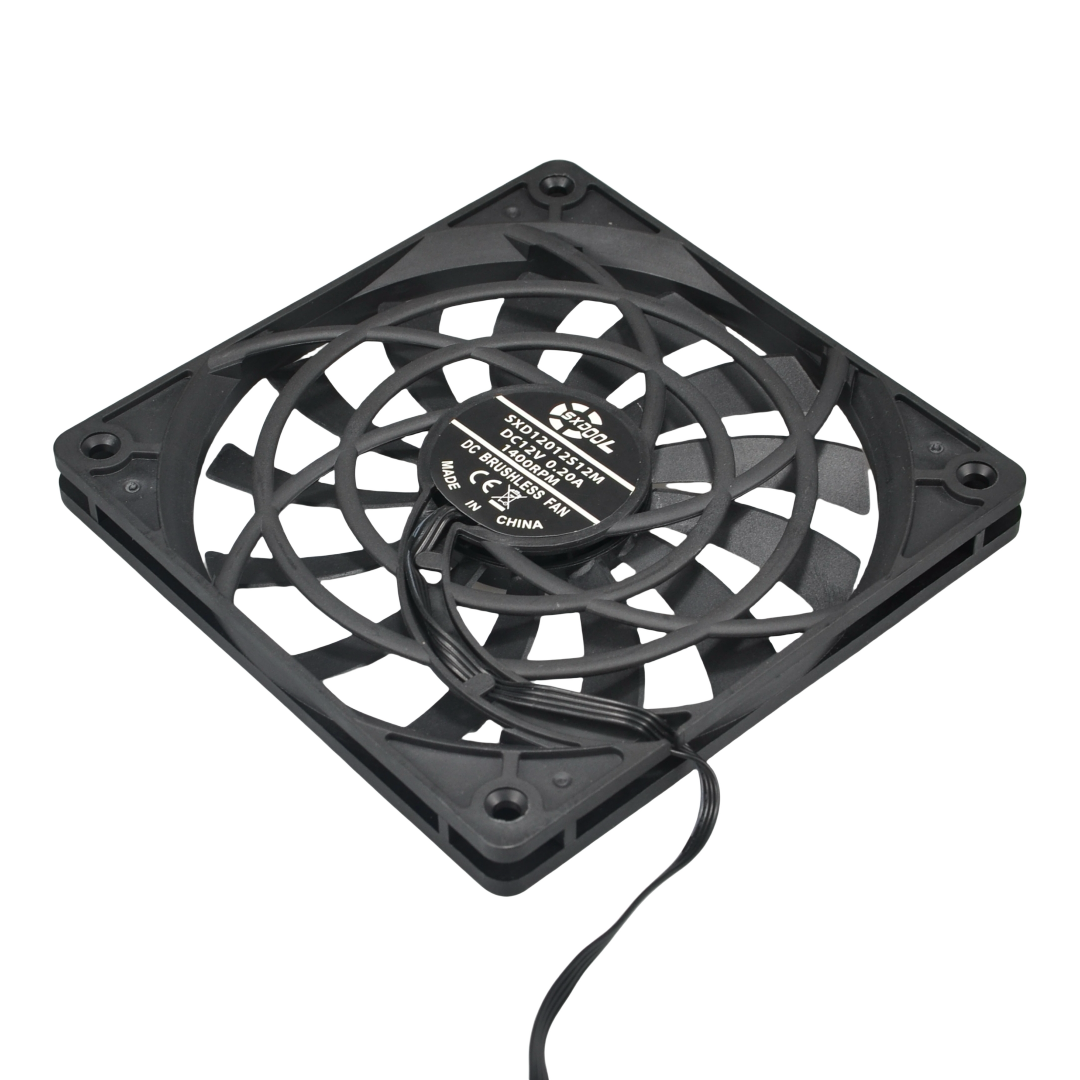
The SXDOOL 12012 slim DC axial platform lists a nominal 120 × 120 × 12 mm frame and identifies the pictured sample as SXD12012S12M, 12 V. This makes it worth reviewing when a custom electronics bay accepts the 120 mm footprint but limits fan depth. Include the guard, fasteners, cable exit and inlet/outlet clearance in the complete installation envelope.
The pictured 12 V sample must not be connected directly to a 24 V control supply. The family page lists separate voltage configurations; it does not establish universal input or an exact 24 V counterpart to this sample. If 24 V is required, request a separately identified configuration and its documents. Confirm the fan’s electrical supply and starting requirements independently of the PLC’s power circuit.
No configuration-specific pressure–airflow curve, acoustic result, control/feedback interface, environmental rating, service-life value or certification is assigned by this guide. Request the current drawing and applicable technical evidence through the technical document resources or the RFQ below. The candidate is not approved for a restrictive duct, a sealed enclosure’s cooling duty, a named PLC/IPC platform or a safety-related function without the corresponding engineering review and test.
Send the bay layout and define the sample test
Include the PLC and IPC models and revisions, populated modules, workload, measured temperature concern, maximum ambient and applicable temperature limits. Add a dimensioned bay sketch showing wireways, the proposed fan location, guard, air direction, return path and service space. Identify the available fan supply, connector and pinout, noise requirement, contamination exposure and required control or monitoring signals.
For a candidate test, use the intended enclosure, installed modules, cables and representative sustained workload. Compare the affected device temperatures and local air temperatures after stabilization with the agreed limits, including the intended highest ambient and service condition. Record the exact fan revision, supply and installation. Plan any fan-fault check with the equipment designer; do not disable controller protection or operate with exposed live parts. A purchase specification should follow that evidence, rather than treating the candidate photograph as an approval.
PLC and industrial-PC cooling questions
Does every PLC cabinet need an extra internal fan?
No. A controller designed for natural convection may operate correctly when its installation space and ambient conditions are maintained. Establish a temperature or airflow need first. An added fan brings supply, noise, maintenance and fault-response requirements of its own.
Does a fanless industrial PC remove the cabinet cooling requirement?
No. Fanless describes how that PC moves heat to its surroundings. The cabinet still needs to reject the total equipment heat, and the PC must retain the manufacturer’s orientation and clearance. An external circulation fan should be evaluated as part of the cabinet design, not as permission to alter the PC.
Can this slim fan replace the original fan inside an IPC?
Not on nominal size alone. An internal replacement requires the PC manufacturer’s approved service part or a validated configuration covering mounting, wiring, control, monitoring and thermal behavior. The SXD12012S12M shown here is a candidate for a separately designed cabinet air path, with no branded replacement approval implied.
Why is the average cabinet temperature not enough?
The air entering a controller or PC can be warmer than air elsewhere in the cabinet, especially near adjacent power supplies or obstructed passages. Use the device manufacturer’s specified temperature reference and check the relevant location under the actual workload. A cool reading at the door does not establish the IPC’s local condition.
Explore industrial cooling fan applications · Robot controller cabinet cooling
Sources checked 21 October 2026. Equipment-manufacturer instructions explain installation constraints; they do not establish an endorsement or tested compatibility relationship with SXDOOL.