Blog

SXDOOL · application engineering guide
Cooling Fans for Compact 5G Edge Computing Nodes
Assess edge-node heat sources, intake conditions, airflow resistance, fan control and maintenance before requesting an SXDOOL cooling fan sample.
Updated 27 October 2026 · Application selection guidance
Select for the edge appliance and its actual installation
A compact 5G edge node in a non-climate-controlled closet needs a cooling assessment at both the appliance and installation levels. Record the node configuration, sustained workload, maximum measured intake temperature, permitted mounting orientation and available service access before shortlisting a fan. A room-temperature reading alone is not a sufficient acceptance test for a computer mounted beside other heat-producing equipment.
This selection task concerns airflow through the individual appliance, including local heatsinks and expansion modules. Use the separate server-cabinet cooling guide when the main question is moving heat out of the enclosure or organizing cabinet intake and exhaust.
Map heat sources before choosing fan placement
Identify the processor or compute module, accelerator if fitted, memory, storage, networking hardware and power conversion components. Dell's XR4000 documentation illustrates why configuration matters: its edge compute sleds combine several of these functions and have their own cooling arrangements. Dell XR4000 design.
For engineering review, sketch intake, heatsinks, fan, exhaust and obstructions in the final enclosure. Check whether air passes through the intended fin channels, whether cables obstruct the path, and whether warm exhaust can return to the inlet. These are proposed layout checks; they do not prescribe one fan position for every edge computer.
Define workload, dust, service and noise constraints together
Record the intended compute power mode and concurrent processing, storage and network activity. NVIDIA documents thermal management that can reduce clock frequencies when temperature limits are reached. Therefore, a proposed acceptance test should log application throughput as well as temperature: a running node may not be delivering its required sustained performance. NVIDIA thermal management.
For a vented design, specify the filter, access route and maintenance criterion before installation. Dell's optional XR4000 filtered bezel includes monitoring that alerts when filter replacement is needed, illustrating that filtration requires a service plan. Do not transfer that monitoring capability to an unrelated fan. Dell XR4000 design.
Specify the acceptable noise at the installed location and test the complete operating profile. NVIDIA's documented quiet and cool fan profiles demonstrate a temperature-dependent control approach; their settings are platform-specific. NVIDIA fan profiles.
Qualify the fan in the finished equipment
Compare the fan pressure–airflow curve with the resistance of the actual heatsink, grille, filter and duct path. Maximum free-air airflow and maximum static pressure are endpoint figures, not a complete prediction of installed performance. Noctua's engineering comparison shows why the useful operating point matters. Noctua pressure–airflow explanation.
A proposed validation plan should cover the highest specified intake temperature, sustained workload, final orientation, representative filter loading, starts and restarts, and the equipment's documented fan-fault response. Confirm supply, starting current allowance, mounting envelope, connector, pinout, PWM input and tachometer or alarm interface against exact-model documents. A candidate fan becomes an approved choice only after the equipment owner accepts the relevant thermal, acoustic, electrical and mechanical results.
Frequently asked questions
Can a cabinet fan solve a hot edge compute module?
It may improve the air supplied to the appliance. It does not establish that air crosses the module's heatsink. Check cabinet intake conditions and internal component temperatures separately in the assembled installation.
Does an edge AI computer always require a fan?
No. Some industrial computers conduct heat into an external finned enclosure for passive cooling. Choose the thermal architecture against the actual workload and environment; adding a fan is not automatically the correct modification. OnLogic fanless cooling.
Can I copy another platform's fan curve or PWM settings?
No. Confirm the appliance controller, sensors and exact fan interface first. A temperature-based profile is an engineering starting point, not evidence that the replacement fan will start, report speed or cool correctly.
What should I provide for an SXDOOL fan review?
Provide the exact appliance configuration, heat/load data, maximum intake temperature, space and airflow sketch, supply details, filters, noise target, control signals and service constraints. Request exact-model documents and sample validation before approving application fit.
SXDOOL candidates to review
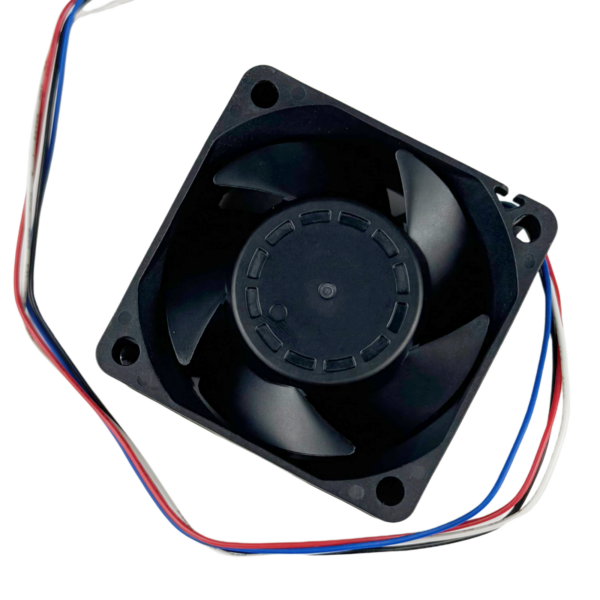
Use SXD6038B24H-RDP as a model reference when requesting a configuration review for a compact edge node. Request the current dimensional drawing, rated supply, startup requirements, connector pinout, and control/alarm specification. Confirm whether your controller requires PWM control, FG speed feedback, an alarm output, or a combination, and match the exact offered configuration. Validate installed airflow and noise under the appliance’s sustained workload; this model has not been qualified for the edge appliance described here.
Selection boundary: If the board requires FG RPM feedback, confirm an FG-capable configuration rather than assuming an alarm output can provide speed data. Request another configuration if the offered supply, mounting envelope or installed acoustic performance does not meet the design requirements. No 1U fit, ingress rating, service life or edge-system approval is established by this guide.
Review SXD6038B24H-RDP · View technical document resources
Discuss this candidate for an edge node
Include the application name, equipment drawing and operating conditions in your inquiry. Request a sample only after checking the exact configuration.